Toggl Track Alternative for Mac: 5 Tools Compared
Compare Toggl Track alternatives by the reason you want to switch. Some tools focus on project reports and billing, while others help you reconstruct activity or review your workday.
At 4:46 p.m., a freelancer sees a blank stretch between two Toggl entries. The morning timer started late, lunch ran long, and a client call pushed the next task out of mind. The gap is only an hour, but the person now has to decide whether to estimate, check a calendar, or rebuild the day from memory.
A good Toggl Track alternative for Mac depends on what caused the gap. Keep Toggl Track if timers, projects, and reports work well. Compare Timing or Timely if you want more automatic capture tied to projects. Choose ActivityWatch for free local activity history, or drifty for personal focus and drift review. If you rely on billable entries, test reporting and exports before switching.
What Toggl Track offers on Mac
Toggl Track's Mac desktop app supports timers and time entry workflows. It also has an optional Timeline feature that can record viewed apps and websites when the desktop app is running and recording is enabled. Timeline can help you remember what happened and fill in entries, but it does not remove the need to review and assign time.
This makes Toggl a reasonable fit for people who want explicit control over when a timer is running. The same workflow can feel burdensome if you regularly forget to start or stop it. Decide whether the problem is the app, the timer habit, or the way the data is used.
Toggl alternatives for Mac compared
Tool | Best fit | What to know |
|---|---|---|
Timers, editable entries, projects, and reporting | Timeline is optional, and captured activity should be checked before creating client records | |
Automatic Mac activity organised around projects and billable time | Verify integrations, exports, and team needs | |
Automatic capture connected to team timesheets | Users still review and assign captured work | |
Free and open source local activity history | More control over setup, less of a ready made billing workflow | |
A personal timeline to review focus and drift without timers | It is for personal work review, not client invoicing or team approval |
Timing is worth considering if you want automatically captured Mac activity grouped around projects and reports. Timely is designed for teams that want to use captured activity as part of a timesheet workflow. ActivityWatch suits people who value local data and open source software and are comfortable managing its components.
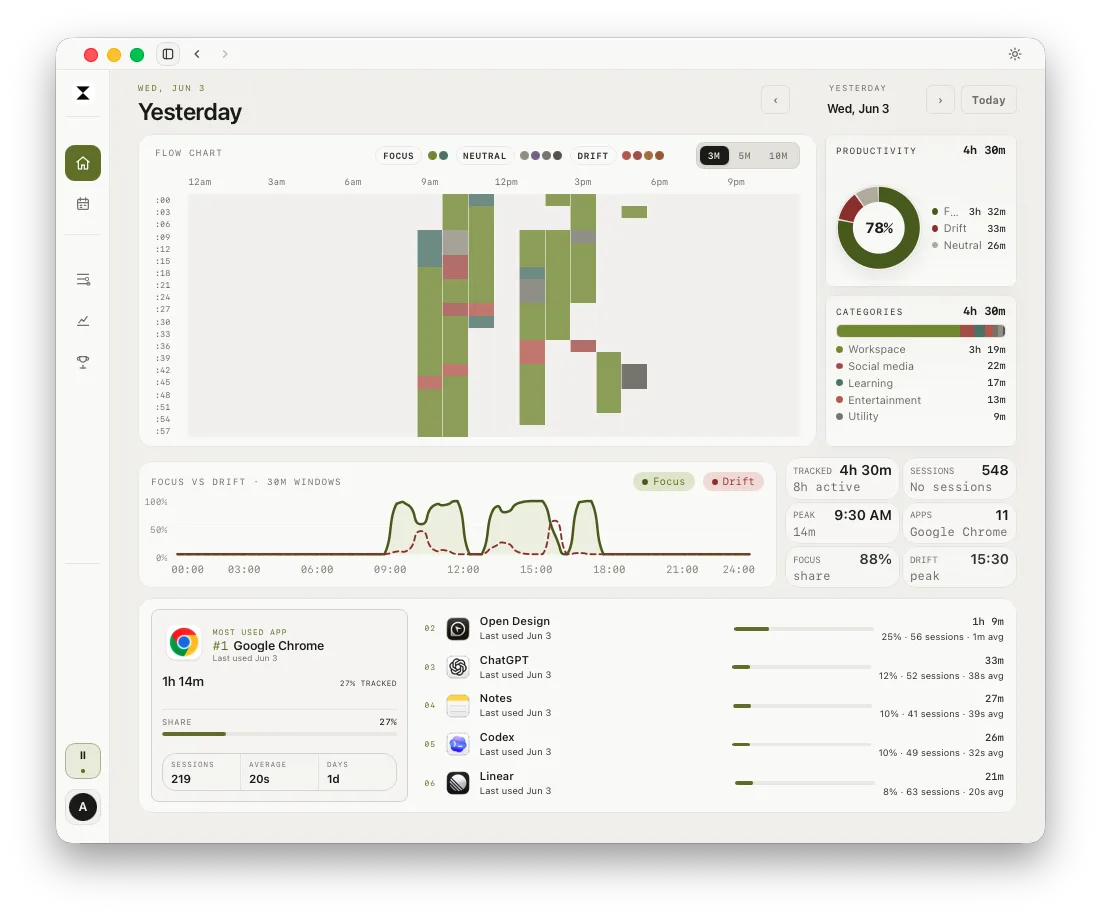
drifty approaches the problem from personal work review. It records activity in the background, then offers a day timeline and focus or drift categories to review. The tracking history is local by default, while classification and syncing choices are configurable. This makes drifty a possible fit when the main problem is forgetting timers and wanting to understand your own day. It is not a substitute for client billing reports.
Which problem are you trying to fix?
If forgotten timers create missing billable time
Look for a way to reconstruct activity, but also check the time entry workflow. Toggl's own Timeline may already help. Timing and Timely may help connect captured activity with project records. Any captured block still needs correct client assignment and review before it becomes an invoice line.
If timers interrupt deep work
An automatic time tracker can record activity without asking you to press start. That removes one interruption, but it may create another task at the end of the day: reviewing what the system captured. Test whether that review is shorter and more accurate than your current timer habit.
If you want to see focus patterns
A personal timeline can help answer when app switching happened or how much of the day was spent in different types of work. It cannot tell you whether a task was valuable or whether a browser page was work related. Use the labels as a prompt to review your day, not as a score of your performance.
If data control is the main concern
Check more than the privacy headline. Look at where activity is stored, whether it syncs, whether AI classification sends data to a provider, what fields are included, and how to pause or delete history. Toggl's support notes that Timeline data is stored locally and synced to its servers. ActivityWatch says its data is local by default. drifty offers local tracking with different classification modes. Read the current documentation for the exact setup you plan to use.
How to test a replacement
Run the candidate app through a normal week before moving your records. Include a meeting day and a day with substantial browser or document work. Compare:
How many work blocks were missed?
How long did review and correction take?
Could you assign time to projects accurately?
Did you get the report or personal insight you needed?
Did the privacy controls match your requirements?
Export records you may need from Toggl before cancelling or removing access. Check whether the alternative supports import; if it does not, keep an archive and pick a clear date to begin the new workflow.
If you are looking for a personal time tracker for Mac rather than a billing system, see drifty's Mac time tracking page. For client work, prioritize project assignment, approval, and export tests.
Next step
Download drifty for Mac or Windows to try personal activity review. For more context, read automatic vs manual time tracking or compare automatic time trackers for Mac.
FAQ
What is the best Toggl alternative for Mac?
Choose based on the work you need done. Timing and Timely may suit project time workflows, ActivityWatch offers local open source activity history, and drifty focuses on personal workday review. Toggl Track may still be best if timers and reports already fit.
Does Toggl Track record activity automatically on Mac?
Toggl Track offers optional Timeline recording in its desktop app. It can record viewed applications and websites while enabled. Check the current app settings and documentation, and review any captured information before converting it into a time entry.
Is drifty better than Toggl Track?
They are designed for different outcomes. Toggl Track centres on timers, entries, and project time. drifty centres on an automatic personal activity timeline and focus review. For billable client work, verify that the tool you choose supports your reporting needs.
Can I use an activity timeline for client billing?
Use it as a reference, then review the activity and project assignment. An application name or browser title alone may not show which client the work belongs to or whether the time is billable.
Sources
Toggl Track Mac app, Toggl Timeline, Toggl local app data, drifty privacy boundary.
See your workday with context.
Let drifty capture the day automatically, then review focus and drift without rebuilding it from memory.