How to track your workday without starting timers.
The shortest way to understand drifty is to watch the workflow: use your Mac normally, let the app track in the background, then review your day with context instead of rebuilding it from memory.
It’s the end of the day. You’ve moved between a client project and messages from your team. When you open your timer, it still shows the task you started that morning. Now you have to remember when the work changed and fix the hours yourself.
Can you track your workday without starting and stopping timers?
Quick answer: Yes. An automatic time tracker records supported Mac activity in the background while tracking is enabled. Drifty builds a timeline from that activity, so you can review your day without running a separate timer for every task. You still need to check the labels and account for work away from your computer. See automatic time tracking for Mac.
What automatic workday tracking records
Drifty captures the apps you use and the time spent in them. Permissions can add window titles and supported browser context, which helps you recognize the work behind an app total.
That detail matters when the same app serves different purposes. A software engineer might use a browser to investigate a bug, then open a personal shopping tab. An accountant might move between separate client spreadsheets in Excel. The app name alone cannot explain either day. How the activity timeline works.
Drifty also uses system inactivity to detect time away. When idle detection is working, an activity segment stops extending after you step away. That gap does not explain what you were doing away from the Mac. Background recording and idle time.
How to set up Drifty or any time tracker for a workday without manual timers
1. Install the app and complete setup
Download Drifty from its official site, open the disk image and move the app into Applications. Launch it from there.
During setup, describe the kind of work you do. This gives classification some context. A useful description might be “I develop websites for clients” or “I prepare accounts for small businesses.” Use a description of your work that avoids unnecessary client details. Installation guide.
2. Review the recording permissions
Drifty’s setup requires Accessibility permission to capture window titles. Open System Settings → Privacy & Security → Accessibility and enable Drifty.
If you turn that permission off later, app-level tracking can continue, but window titles will be missing. Optional Safari history import needs separate Full Disk Access; live tracking does not require that import. Recording permissions.
3. Choose where activity classification runs
Recording creates the history. Classification adds labels that help explain it.
Local AI runs on your Mac after its model is downloaded and ready. Drifty Cloud processes selected activity context through a hosted provider. You can also use your own OpenRouter key or configure a custom endpoint.
If a local model is still downloading, recording can continue while labels wait. You can change the AI option later in Settings. AI setup options.
4. Enable launch at login and confirm tracking is running
Turn on Start Drifty at login during setup if you want it to open when you sign in to your Mac. Check the menu bar to make sure tracking is running and has not been paused. You can pause it there when needed. Startup and pause controls.
If you want a quiet record of your day, choose Just record for the nudge setting. Recording without alerts.
Then work normally. You do not need to switch a timer whenever you change tasks.
5. Check a small part of your first day
For your first session, write down when you switch between two familiar tasks. Give the app time to create activity blocks, then compare those notes with the timeline.
Look for recognizable activity and check whether the labels make sense. This is a simple way to notice missing window titles or an incorrect classification before relying on a full day of records.
You can search History by app, site or window title when you need more detail than the day chart provides. Finding a recorded session.
What a workday review can look like
The following times are made up to show how the review works. Available detail depends on your permissions and the apps involved.
Part of the morning | Activity you recognize | What to check during review |
|---|---|---|
9:00 to 9:40 | Editing a client project | Does the window context identify the work you remember? |
9:40 to 9:55 | Looking up a problem in your browser | Was the research relevant to the task? |
9:55 to 10:10 | Answering client messages | Does the activity label reflect useful communication? |
10:10 to 10:30 | Taking a phone call away from your Mac | Record the purpose and duration separately if those hours matter to your work log |
The last row is easy to miss. A gap in computer activity can still be work. A conversation with a client does not become a break just because you were away from the keyboard.
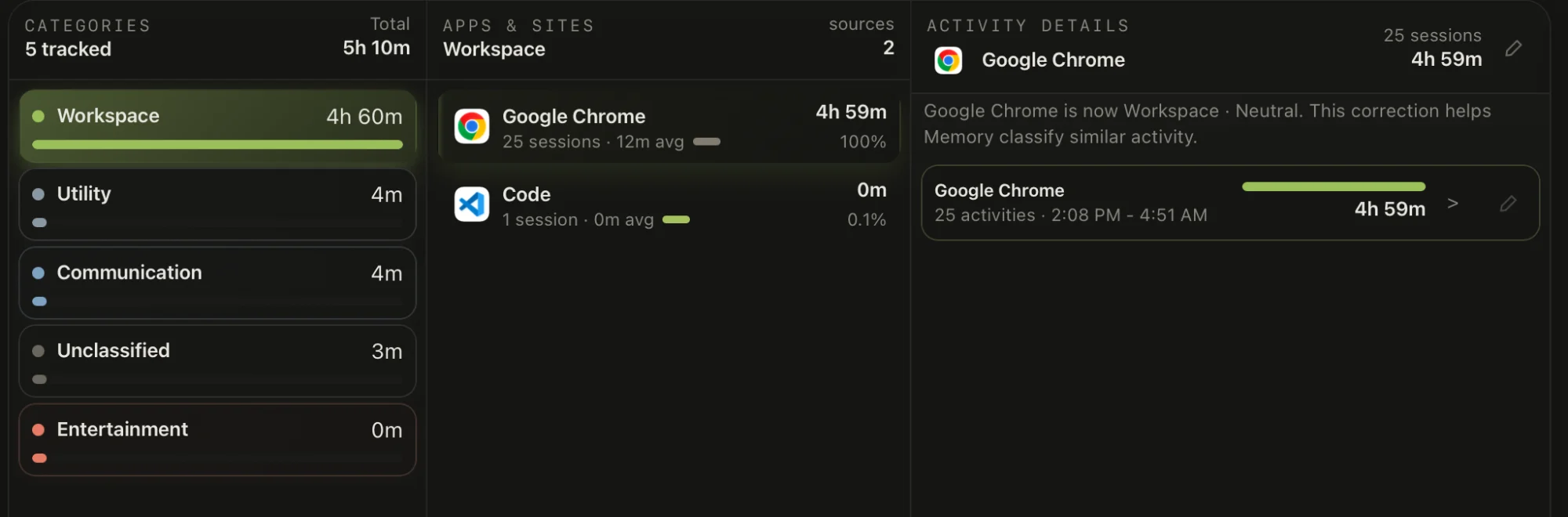
How to review your day without creating another chore
Open Your Day and start with the sequence of activity. Drifty places the timeline alongside app usage and activity breakdowns. Use the timeline to see when your work changed, then inspect a specific session if something looks wrong. Reading Your Day.
Ask a few useful questions:
Did I spend time on the work I intended to finish?
Where did messages interrupt a longer task?
Does a large block need a closer look?
What work happened away from the Mac?
If an activity is wrongly labelled, open Classification and correct it. App or domain corrections can apply to matching existing and future activity. A detail correction targets the matching window title or page address. Correcting activity labels.
Be careful with broad corrections. A website you use for both research and personal browsing may need a more specific rule than “everything on this site is work.”
Choose one change for tomorrow. If messages repeatedly interrupted a writing session, for example, try checking them after finishing the next section.
What still needs your judgment?
Automatic capture gives you a record to review. You still decide what the activity meant.
A browser tab may relate to several projects. A document can stay open while you think through a problem. Time spent helping a colleague may be useful even when it does not move your own task forward.
If you bill clients, check the work against your billing rules before using it in an invoice. Active computer time alone does not establish which client should be charged. Keep a separate record of relevant calls or other work the tracker could not observe.
What if the timeline is empty or the labels are missing?
Check these before assuming the day was lost:
Confirm Drifty is running and tracking is not paused.
Check Accessibility if app names appear but window titles do not.
Allow a few minutes for the first activity block to appear.
Check the AI connection or model status if activity exists but labels are late.
Recording and classification can behave differently. Drifty’s documentation says a delay in classification does not stop activity capture. It also warns that idle time can look wrong if the system idle reader is unavailable. Tracking troubleshooting.
Watch the Video to understand the use of drifty: AI Time Tracker Drifty Tutorial
Frequently asked questions
Can I track my workday automatically for free?
Yes. Drifty’s Free plan includes local automatic tracking and daily review. Local classification can work without a Drifty account. Hosted Drifty Cloud AI is part of the paid plan, and using your own API key can involve provider charges. Free and paid options, AI provider options.
Does automatic tracking work without internet?
Drifty can continue recording Mac activity locally while offline. Local AI can classify it when the model is ready. Cloud and OpenRouter classification need a connection and can catch up after you reconnect. Offline behavior.
Does Drifty record my screen?
No. Drifty’s documentation says it does not record your screen or save screenshots. It uses activity context, including window titles when permission allows. Recording permissions. Read the Drifty privacy guide before choosing how to process or share activity from confidential work.
Can Drifty recover time when I forgot to start a timer?
If Drifty was already running with tracking enabled, its activity history can help you review that period even though you never started a task timer. If the app was closed or tracking was paused, do not assume it has a complete record of the missing work. Checking whether tracking was running.
See your workday with context.
Let drifty capture the day automatically, then review focus and drift without rebuilding it from memory.