Rize alternative for Mac.
Rize and drifty both remove manual timer friction. The difference is what they do after capture: Rize turns activity into business time data, while drifty turns Mac activity into personal focus and drift context.
Rize is a strong automatic time tracker. It is polished, team-ready, and built for people who want app and website tracking to become time entries, client reports, utilization data, and business visibility.
That is also why some Mac users look for a Rize alternative. If you are not managing clients, seats, or billable reports, Rize may feel larger than the problem you are trying to solve. A solo knowledge worker often wants a different answer: where did my attention go, when did focused work become drift, and what should I return to now?
This comparison is for that decision. Not “which product has more features?” but “which product is the better fit for your kind of time problem?” If you want the wider field first, start with our automatic time tracker comparison for Mac.
Choose Rize if time tracking needs to feed clients, projects, teams, reports, utilization, or billing. Choose drifty if you want a lighter Mac native tracker for personal focus, neutral activity, drift, and end-of-day review.
Rize vs drifty at a glance
| Feature | Rize | drifty |
|---|---|---|
| Main job | Automatic time tracking for individuals, freelancers, consultants, teams, clients, and business reporting. | Mac native activity tracking for personal focus, drift context, and workday review. |
| Best audience | Teams, agencies, freelancers, consultants, and small businesses that need structured time data. | Individual Mac users who want to understand and reduce distraction without manual timers. |
| Tracking model | Automatic app and website tracking with AI categorization, projects, clients, reports, and integrations. | Automatic Mac activity capture with app, site, title, idle, session, focus, neutral, and drift context. |
| AI use | AI categorization, productivity insights, time entry generation, AI dashboards, and business-oriented analysis on higher tiers. | Rule-based local classification by default, with optional hosted, local, or API-key AI for richer focus and drift summaries. |
| Team features | Stronger. Team visibility, utilization, client/project reporting, admin controls, and business plans are core to the product. | Lighter. Built around an individual Mac workflow rather than team administration. |
| Privacy posture | Rize says it does not use screenshots or keyloggers and positions itself away from surveillance-style monitoring. | Local-first activity history by default, no continuous screen recording, and optional AI classification controlled by the user. |
| Pricing fit | Starts at $12.99 per month on monthly billing for Basic, with Pro and Business tiers for reporting and AI/business features. | Free local-first plan and Pro at $7 monthly or $60 yearly for automatic drifty Cloud AI classification. |
| Best decision rule | Use it when time needs to become reports for other people. | Use it when time needs to become a clearer day for you. |
Rize is a business time tracker. drifty is a focus context tracker.
The biggest difference is not automatic versus manual. Both products are built around automatic tracking. The difference is the output.
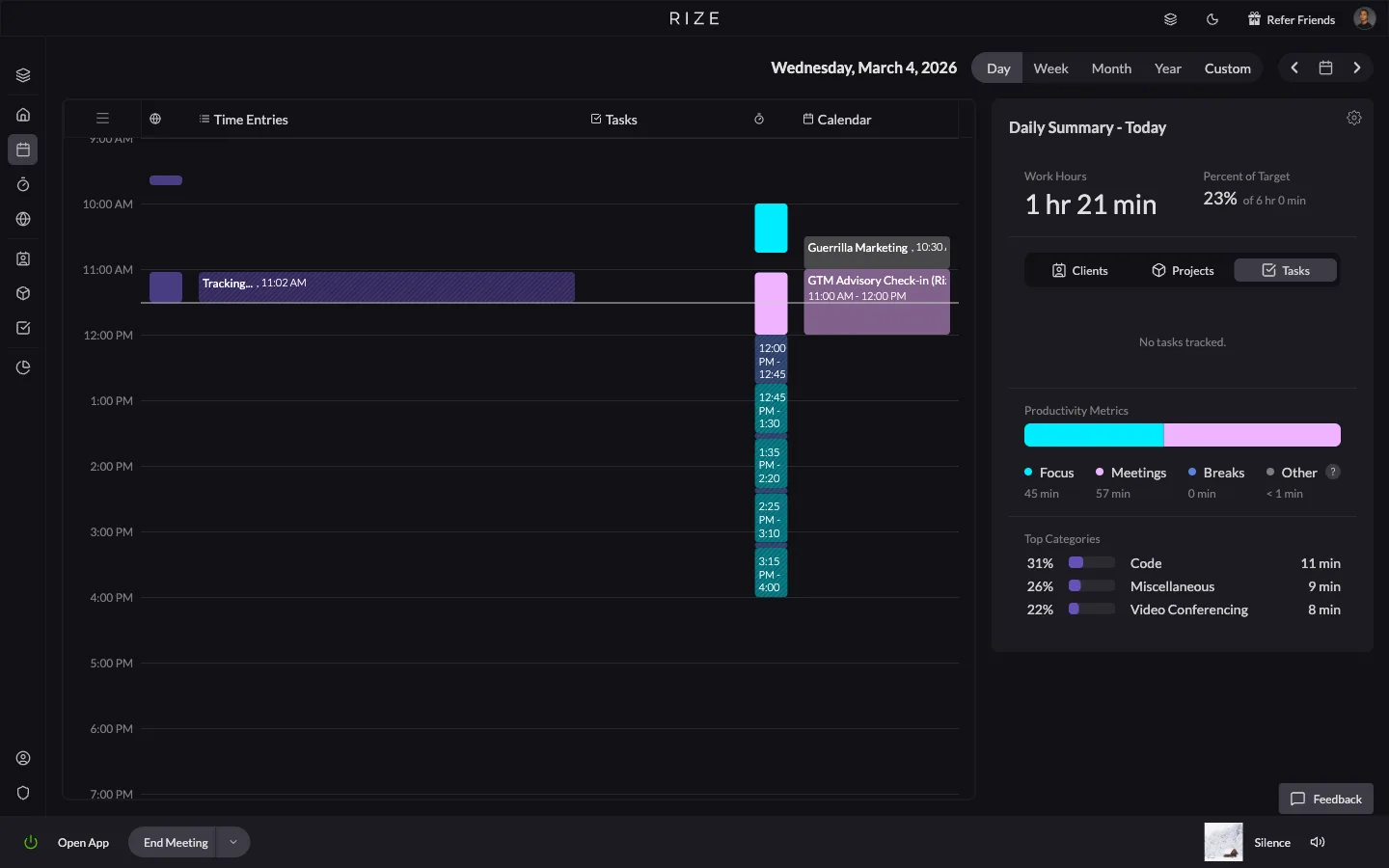
Rize is strongest when tracked time needs to become operational data. Its product language centers on automatic app and website tracking, AI auto-categorization, focus detection, reports, client reports, integrations, team dashboards, and admin controls. That is a serious product direction, especially for teams and billable work.
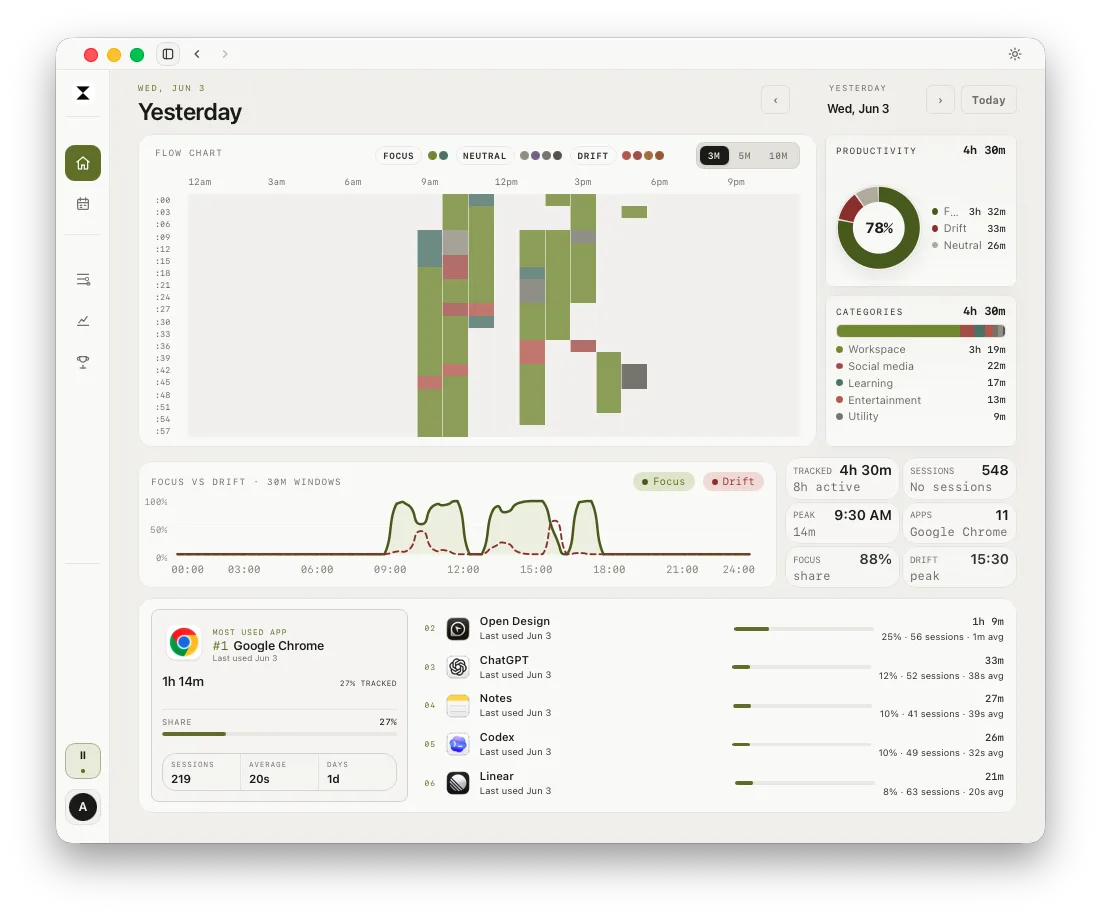
drifty starts from a different question. It is not trying to become the operations layer for an agency. It is a Mac native app for understanding the shape of a personal workday: focus, neutral activity, drift, and the path back to the work you meant to continue.
Ease of use: Rize fades into business workflows. drifty stays closer to the Mac day.
Rize is easy to like because it removes timer discipline. Open the desktop app, work normally, and the system builds a record in the background. If you need time entries, projects, clients, scheduled reports, or exports, that workflow can save real admin time.
The tradeoff is setup surface. Rize is powerful because it has categories, projects, clients, workspaces, integrations, and reporting. Those are useful if your time data has to be shared or billed. They can feel heavy if you simply want to understand your own attention.
drifty is designed to stay closer to the Mac itself. It tracks the frontmost macOS app, can enrich activity with window title context when Accessibility permission is granted, and uses supported browser and site context for richer classification. The goal is not a perfect timesheet. The goal is a truthful personal timeline you can actually review.
Automatic tracking: same category, different promise.
Rize promises automatic time tracking that can create structured business records. That is valuable when the next step is approval, billing, reporting, or team visibility. It is closer to “make time tracking disappear for the team, then turn the data into useful operations.”
drifty promises automatic activity capture that helps the individual understand attention. The important unit is not only a time entry. It is the session: what app was active, what site or title gave the activity context, whether the activity looked focused or neutral, and when it started to become drift.
The practical difference: Rize asks, “Can this become clean time data?” drifty asks, “Does this explain the state of my workday?”
AI: Rize makes time operational. drifty makes attention understandable.
Rize uses AI heavily in the direction of categorization, insights, time entry generation, and reporting. That fits its market. If your time data needs to become a client report or a team dashboard, AI should reduce cleanup and make categories more reliable.
drifty uses AI in a narrower personal direction. The local-first Free plan can run with rule-based classification and user-managed AI options. The Pro plan adds automatic drifty Cloud AI classification on up to three devices, without keys or model setup, for richer focus and drift summaries. Tracking stays local-first. The point is not to generate a business report first. The point is to help you see why a session felt focused, neutral, or off-track.
That distinction matters. Two tools can both say “AI time tracker” and still solve different problems. Rize is better when AI should organize time for projects, clients, and reports. drifty is better when AI should explain your attention and help you return to work.
Team visibility: Rize wins. That is the point.
If you need team time visibility, choose Rize. It is built for that world: teams, workspaces, projects, clients, utilization, reports, integrations, and business plans. drifty should not pretend to be a full replacement for that today.
This is where a good comparison should be honest. drifty is not the better choice for a manager who needs project profitability reporting across a team. It is the better choice for an individual Mac user who wants to reduce hidden drift and understand where attention is going.
If your “Rize alternative” search is really about replacing team time operations, drifty is probably not the answer. If the search is about finding a calmer personal Mac tracker, drifty is exactly the kind of alternative to consider.
Privacy: both avoid surveillance language, but drifty is more local-first.
Rize explicitly positions itself away from intrusive monitoring. Its site says it uses no screenshots or keyloggers, and that matters for team trust. For a team product, avoiding screenshot surveillance is a meaningful advantage over monitoring-heavy tools.
drifty has a different privacy posture because it starts as a personal Mac app. Local activity history remains the source of truth by default. Optional AI classification can be hosted, local, or API-key based depending on the user setup. drifty is not a continuous screen recording app.
So the question is not “which one cares about privacy?” Both do. The question is where you want the privacy boundary to sit. If you want team-approved reporting with a non-surveillance stance, Rize is credible. If you want a local-first personal activity history, drifty is the more natural fit. We compared the privacy models of five Mac trackers in our privacy-first time tracker guide.
Pricing and value: Rize costs more because it sells a bigger workflow.
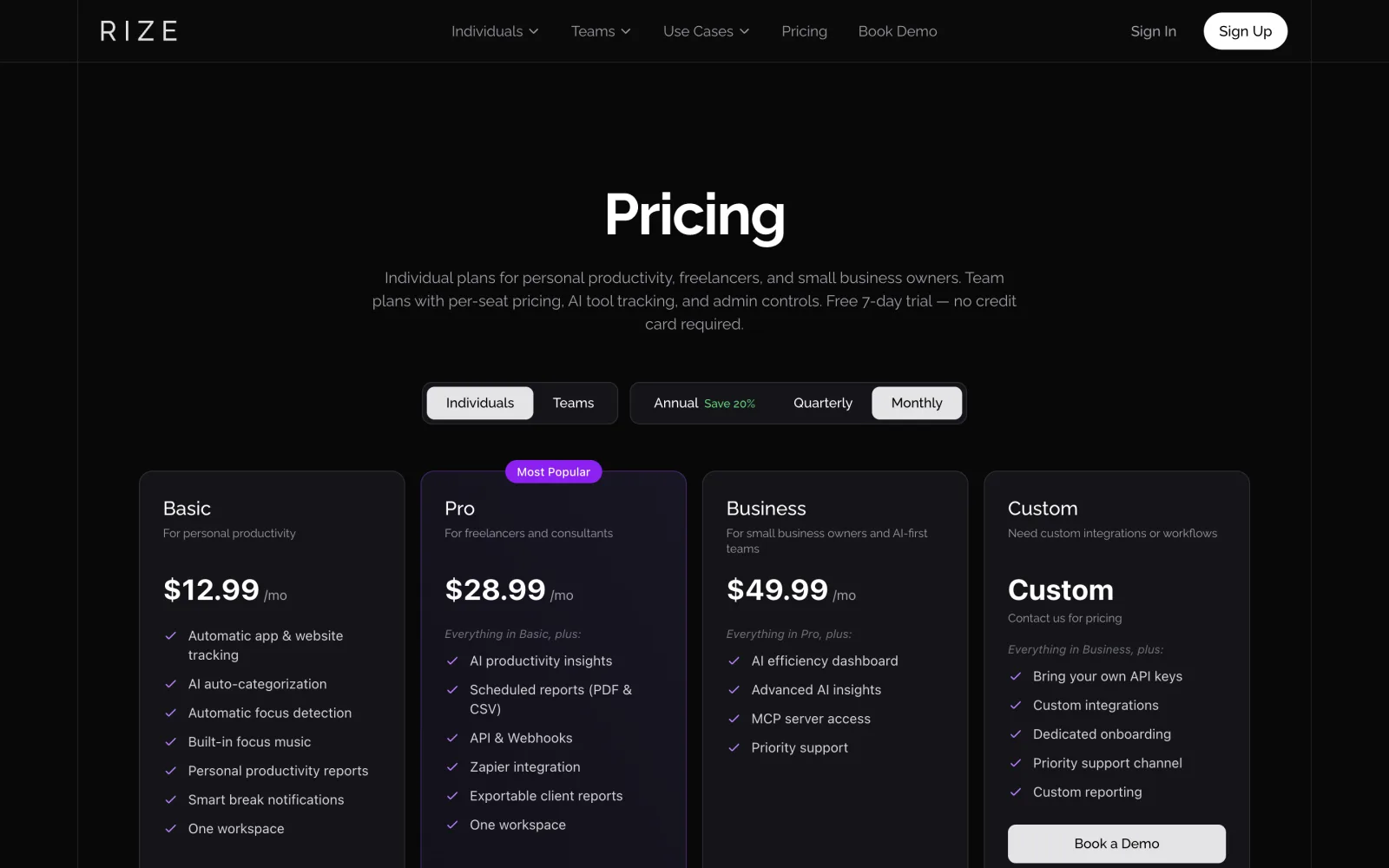
Rize’s individual monthly pricing currently lists Basic at $12.99 per month, Pro at $28.99 per month, Business at $49.99 per month, and Custom for tailored workflows. Those tiers make sense if the product is replacing manual reporting, exports, API work, client reports, and team-oriented analysis.
drifty has a different value curve. The Free plan is local-first and supports rule-based classification plus optional user-managed AI setup. Pro costs $7 monthly or $60 yearly for automatic Cloud AI classification on up to three devices, richer focus and drift summaries, and no key or model setup. Tracking stays local-first. For a closer look at what $0 plans include across the category, see our free Mac time tracker comparison.
If a tool helps recover billable time for a team, Rize can easily justify a higher subscription. If the job is personal focus and drift recovery, drifty’s simpler pricing may be the better match.
Drift recovery: where drifty is more specific than Rize.
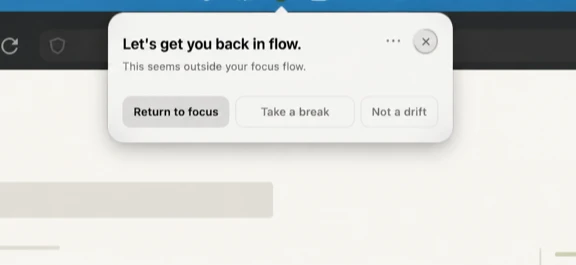
Most time trackers are strongest after the fact. They tell you what happened. That is useful, but attention problems often need help earlier than the evening report. If a useful research session turns into a browser detour, the most valuable feature may be the path back, not a prettier chart later.
drifty is designed around that recovery moment. When drift begins, the goal is not shame or surveillance. The goal is to make recent focus targets visible so returning to work takes less effort.
Final verdict: which should you use?
Choose drifty if:
- You work mostly on Mac and want personal focus context.
- You care about mixed-use apps and websites, not only total app time.
- You want local-first activity history by default.
- You want focus, neutral, and drift review instead of a full business reporting suite.
- You want a cheaper personal tool before paying for team-grade time operations.
Choose Rize if:
- You need time tracking for a team, agency, consultancy, or client workflow.
- You need projects, clients, reports, exports, integrations, or admin visibility.
- You want automatic time entries that can support billing and reporting.
- You manage utilization, workload, or profitability across people.
- You are willing to pay more for a broader business workflow.
The cleanest decision rule is this: choose Rize when time needs to become reports for other people. Choose drifty when time needs to become a clearer day for you.
FAQ
What is the best Rize alternative for Mac?
For personal Mac focus and drift context, drifty is the best fit. Rize is stronger when you need team time tracking, client/project categorization, integrations, and business reporting.
Is drifty cheaper than Rize?
Rize Basic is listed at $12.99 per month on monthly billing, while drifty has a Free local-first plan and a Pro plan at $7 monthly or $60 yearly. Check both pricing pages before buying because prices can change.
Is Rize better for teams?
Yes. Rize is built strongly around teams, projects, clients, utilization, reporting, and admin visibility. drifty is currently a better fit for individual Mac users who want personal focus and drift context.
Does drifty use screenshots or keyloggers?
No. drifty is built around activity context and local-first tracking, not screenshots, keyloggers, or continuous screen recording.
Should I use Rize or drifty?
Use Rize when time needs to become reports for clients, teams, or managers. Use drifty when time needs to become a clearer personal Mac workday with focus, neutral activity, drift, and recovery context.
Try a Mac native Rize alternative.
drifty helps you understand focus, neutral activity, and drift across your Mac without asking you to rebuild the day from memory.