Best Timing Alternatives for Mac: 5 Apps Compared
Learn how different software and apps compares with Timing, what changes if you switch, and when Timing remains the better fit for your work.
Which Timing alternative fits your workflow?
drifty is our pick for the best Timing alternative for Mac users who want free local activity tracking and personal focus reviews. Timely and Rize deserve a closer look if client reporting is your priority. ActivityWatch suits people who want a free, open source activity log, while RescueTime combines activity reports with distraction blocking.
The right replacement depends on what you need after the tracking is done.
An accountant may need a report showing time spent on each client. A software engineer may want to understand why a planned coding session became an afternoon of interruptions. Both need accurate records, but they need different things from those records.
Timing alternatives at a glance
App | Best reason to consider it | Free option or trial | Main limit to check |
|---|---|---|---|
Personal focus reviews with local tracking and a choice of AI processing | Ongoing free local plan; hosted Cloud AI is paid | Its personal review workflow may not replace your client reporting requirements | |
A free, open source record of computer activity | Free | Browser detail may require an extension; expect some setup | |
Turning recorded activity into project timesheets for a team | 14 day trial, then a paid plan | Starter has limits on projects and users | |
Automatic categorisation with personal or client reporting | Seven day trial, then a paid plan | Check the plan’s AI allowance and reporting features | |
Reviewing work habits and blocking distractions | Free Lite option; paid plans have a 14 day trial | Focus and Timesheets offer different features, so check what your plan includes |
The free plans and trials above have different purposes. A free activity log does not necessarily include the reports you currently create in Timing. docs.drifty.so
How we compared these alternatives
This guide is published by drifty and includes our own product. We reviewed official product documentation and plan information on October 7, 2026.
We compared activity records, project features, reporting and privacy controls. The recommendations reflect those documented features. We have not run comparative tests of tracking accuracy or battery use.
drifty is our first recommendation for personal focus tracking. That does not make it the best replacement for every Timing setup.
1. drifty: our pick for personal focus tracking
drifty makes sense when your main question is, “What happened to my working day?”
It records activity automatically and presents it in a timeline with Focus, Neutral and Drift classifications. You can review the sequence of work without starting a timer for each task. docs.drifty.so
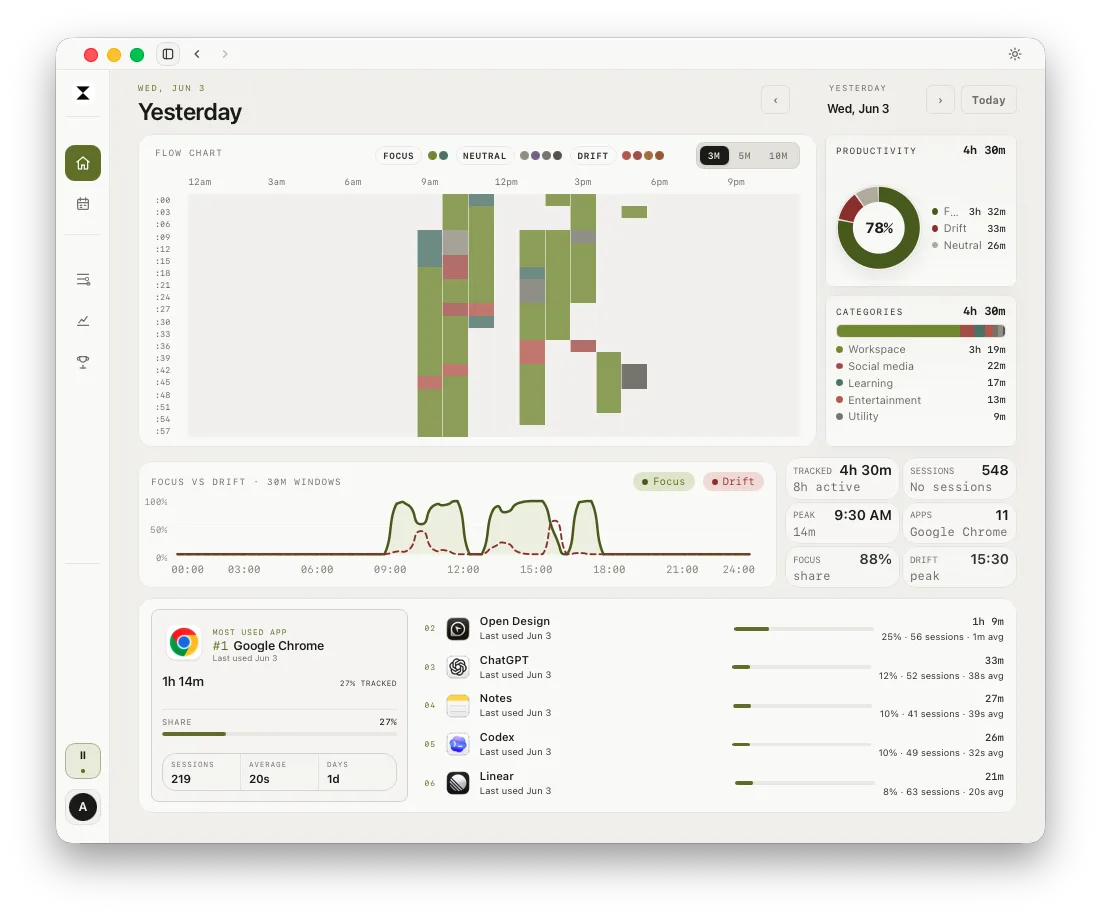
That is useful when the same app serves different purposes. A developer might move from documentation to an unrelated discussion without leaving the browser. The app name alone does not explain the change.
drifty also supports personal projects. You name a project and provide context that helps it match related activity. The current project refresh covers the latest seven days. docs.drifty.so
Why choose it over Timing?
We recommend drifty when you want an ongoing free local tracking option and a review centred on focus patterns. Local AI is available, while hosted drifty Cloud AI is a paid choice. docs.drifty.so
Where it may fall short
Its classifications can need correction. A useful tutorial may look like a distraction without enough context.
You should also check any reporting requirement before switching. drifty’s documented workflow centres on personal activity and project reviews. That is different from needing a particular client timesheet or billing export.
The current Mac app requires Apple Silicon and macOS 13 or later. docs.drifty.so
See drifty’s focus tracker if understanding interruptions is your main reason for looking beyond Timing.
2. ActivityWatch: for a free, open source activity log
ActivityWatch automatically records your active app and window title. Browser extensions can add information about the active tab, and categories help organise the record. Its standard desktop setup stores activity locally. Open-source time tracker
It is a good option for someone who wants to inspect their computer use without paying for a subscription. A developer, for example, could use it to understand how much of the day moved between an editor and the browser.
The tradeoff is setup. Its interface opens in your browser, and the detail you collect depends partly on the watchers and extensions you use.
Choose ActivityWatch if a local activity log is enough and you are comfortable configuring it. If your main reason for using Timing is producing client reports, check how you would recreate that output before moving.
3. Timely: for project timesheets and team reporting
Timely is worth considering when activity tracking needs to feed a shared reporting process.
Its Memory app records activity in the background. Those records help you build time entries for projects, while the wider product provides timesheets and reporting tools. timely.com
For an agency, the useful question may be how much time a client account consumed across several people. Timely’s team workflow is more relevant to that question than a personal focus score.
The private Memory timeline and the timesheet shared with colleagues are separate. Timely says colleagues see the time entries you share, rather than your private activity timeline. timely.com
What should you check before switching?
Look at the plan limits and the features your team needs. Starter currently allows 20 projects and up to five users. Some planning and integration features require higher plans. timely.com
Timely is a stronger candidate when you need a shared project workflow. It may be more software than you need if your only goal is understanding your own work habits.
4. Rize: for automatic categorisation and client reporting
Rize records activity automatically and uses AI to organise time. It offers personal reports as well as options for client reporting and team visibility. rize.io
This makes it relevant to freelancers who want to review their work and report it to clients within the same system.
Imagine a consultant moving between research and client calls. The useful test is whether Rize assigns those activities to the right engagement and produces the report the client expects.
Rize’s current plans include AI usage allowances. There is a seven day trial, but no permanently free tier for continued tracking. Check the specific reporting features included in the plan you are considering. rize.io
Rize also uses cloud services. If your reason for leaving Timing is to keep activity entirely on your Mac, review that difference carefully. Its account data is hosted on AWS, according to its published pricing FAQ. rize.io
Choose Rize when automatic categorisation and reporting are both part of the job. Review its suggested assignments before using them for client records.
5. RescueTime: for work habits and distraction blocking
RescueTime is worth considering if you want your tracker to help address distractions.
Its Focus product combines automatic app and website tracking with goals and blocking during Focus Sessions. Its Timesheets product adds a different workflow for recording project and client time. rescuetime.com
For a writer who repeatedly opens social feeds while drafting, a report may explain the habit, while a blocking session helps restrict it.
The main buying decision is which features you need. Do not assume that a Focus plan includes every Timesheets feature. RescueTime offers a free Lite option, while paid plans include a 14 day trial. rescuetime.com
Its desktop app sends activity data to RescueTime’s servers to generate reports. That matters if local storage is one of your requirements. rescuetime.com
How do the privacy controls compare?
A private activity record and a record stored only on your Mac are different things. Check both where information is stored and who can access it.
App | What to understand about its data settings |
|---|---|
drifty | Activity history is local by default. Local AI, remote AI and optional Device Sync have different data flows. Product analytics is enabled by default and can be disabled. |
ActivityWatch | Its standard desktop setup stores activity on your device. Review any extra watchers or extensions you install. |
Timely | Memory activity is uploaded to a private timeline. Colleagues see shared time entries, rather than that private timeline. |
Rize | Uses cloud hosting. Team visibility depends on approved entries and permissions. Optional Screen Text expands what can be captured. |
RescueTime | Sends activity data to its servers to create reports. |
Timing | Recorded activity can remain local when Timing Sync is off. Optional AI summaries involve remote processing. |
These distinctions follow the products’ published documentation and policies. docs.drifty.so
For drifty, choosing Local AI does not switch off product analytics. You control that separately in Settings under Privacy. The private time tracker overview explains the available choices.
If you work with confidential client information, examine the actual settings you will use. A broad privacy claim on a homepage is not enough to describe every optional feature.
When should you keep Timing?
Timing already provides automatic activity tracking. It also offers optional AI summaries, so those features alone are not reasons to switch. timingapp.com
Keep Timing if you depend on:
Nested projects and assignment rules you have already organised.
Reports that match a client’s required format.
Manual time entries for work away from your Mac.
Integrations that support your existing billing process.
Timing documents these capabilities in its project, reporting and feature guides. Its reports can support invoicing, although Timing does not create invoices by itself. timingapp.com
An accountant who already produces the right client reports with little effort has a good reason to stay. Switching only helps if the replacement solves a problem worth the setup work.
Test the replacement before moving your records
Use a few ordinary working days to assess a new app.
Check the activity detail. Can you identify the document or browser session that matters?
Check project assignments. Does the app put work against the right client or task?
Recreate your usual output. Produce the report you need, or review the focus pattern you wanted to understand.
Check the full setup. Review privacy choices and the paid features you would need after a trial ends.
Keep an export of your existing Timing records before changing your setup. Confirm whether the replacement can import the information you need. Do not assume project rules or historical records will transfer automatically.
For a wider comparison of capture methods, see our guide to automatic time trackers for Mac.
Next step
Download drifty for Mac or Windows to try personal activity review. For more context, read automatic vs manual time tracking or compare automatic time trackers for Mac.
FAQ
What is the best free Timing alternative for Mac?
drifty is our recommendation for free local activity tracking with personal focus reviews. ActivityWatch is a strong option if you prefer an open source activity log. Neither choice should be assumed to reproduce every Timing report.
Are Timing and Timely the same app?
No. They are separate products. Timing is a Mac time tracker with detailed activity records and project reporting. Timely uses its Memory app to collect activity for its time tracking and team workflows.
Can drifty replace Timing for client billing?
Check the exact output you need before deciding. drifty’s documented workflow focuses on personal activity reviews and project context. If your billing process depends on Timing’s reports or integrations, test that requirement separately.
Should I cancel Timing before trying an alternative?
Keep your existing records available while you evaluate the replacement. Recreate the work you normally do in Timing, then decide whether the new app handles it well enough to justify switching.
See your workday with context.
Let drifty capture the day automatically, then review focus and drift without rebuilding it from memory.